Cracker
The Cracker module includes all operations on the device, such as device configuration, data transmission, and acquisition.
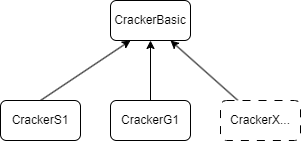
- class cracknuts.cracker.cracker_basic.ConfigBasic[source]
Bases:
object- __init__()[source]
- dump_to_json()[source]
Dump the configuration to a JSON string.
- Return type:
str
- load_from_json(json_str)[source]
Load configuration from a JSON string. If a value in the JSON string is null, it will be skipped, and the default configuration will be used.
- Return type:
ConfigBasic
- class cracknuts.cracker.cracker_basic.CrackerBasic(address=None, bin_server_path=None, bin_bitstream_path=None, operator_port=None)[source]
Bases:
ABC,Generic[T]- DISCONNECTED = -2
The basic device class, provides support for the CNP protocol, configuration management, firmware maintenance, and other basic operations.
- NON_PROTOCOL_ERROR = -1
- __init__(address=None, bin_server_path=None, bin_bitstream_path=None, operator_port=None)[source]
- Parameters:
address (str | tuple | None) – Cracker device address (ip, port) or “[cnp://]<ip>[:port]”, If no configuration is provided here, it needs to be configured later by calling set_address, set_ip_port, or set_uri.
bin_server_path (str | None) – The bin_server (firmware) file for updates; normally, the user should not specify this.
bin_bitstream_path (str | None) – The bin_bitstream (firmware) file for updates; normally, the user should not specify this.
operator_port (
int) – The operator port to connect to.
- change_ip(new_ip, new_mask, new_gateway)[source]
Change the IP address of the device.
- Parameters:
new_ip (str) – The new IP address of the device.
new_mask (str) – The new IP address of the device.
new_gateway (str) – The new IP address of the device.
- Return type:
bool- Returns:
True if the IP address is changed, False otherwise.
- connect(update_bin=True, force_update_bin=False, bin_server_path=None, bin_bitstream_path=None, force_write_default_config=False)[source]
Connect to cracker device.
- Parameters:
update_bin (bool) – Whether to update the firmware.
force_update_bin (bool) – Whether to force update the firmware while the device is running normally (by default, firmware updates are not performed when the device is running normally).
bin_server_path (str | None) – The bin_server (firmware) file for updates.
bin_bitstream_path (str | None) – The bin_bitstream (firmware) file for updates.
force_write_default_config (bool) – Whether to force update the configuration while the device is running normally (by default, configuration updates are only performed when updating the firmware).
- Return type:
None- Returns:
None
- disconnect()[source]
Disconnect from cracker device.
- Return type:
None- Returns:
None
- dump_config(path=None)[source]
Dump the current config to a JSON file if a path is specified, or to a JSON string if no path is specified.
- Parameters:
path (str | None) – the path to the JSON file
- Returns:
the content of JSON string or None if no path is specified.
- Return type:
str | None
- get_address()[source]
Get the device address in tuple format.
- Returns:
address in tuple format: (ip, port).
- Return type:
tuple[str, int]
- get_bitstream_version()[source]
- get_connection_status()[source]
Get connection status.
- Returns:
True for connected and False for disconnected.
- Return type:
bool
- get_current_config()[source]
Get current configuration of Cracker. Note: Currently, the configuration returned is recorded on the host computer, not the ACTUAL configuration of the device. In the future, it should be synchronized from the device to the host computer.
- Returns:
Current configuration of Cracker.
- Return type:
ConfigBasic
- abstractmethod get_default_config()[source]
Get the default configuration. This method needs to be implemented by the specific device class, as different devices have different default configurations.
- Returns:
The default config object(The specific subclass of CommonConfig).
- Return type:
ConfigBasic
- get_firmware_info()[source]
- get_firmware_version()[source]
Get the version of the equipment.
- Returns:
The equipment response status code and the version of the equipment.
- Return type:
tuple[int, str | None]
- get_hardware_model()[source]
Get the name of the equipment.
- Returns:
The equipment response status code and the name of the equipment.
- Return type:
tuple[int, str | None]
- get_id()[source]
Get the ID of the equipment.
- Returns:
The equipment response status code and the ID of the equipment.
- Return type:
tuple[int, str | None]
- get_operator()[source]
Get the operator object for this Cracker instance.
- Returns:
Operator object.
- Return type:
Operator
- get_uri()[source]
Get the device address in URI format.
- Returns:
URI. if cracker address is not specified, None is returned.
- Return type:
str | None
- load_config_from_file(path)[source]
Load config from a JSON file.
- Parameters:
path (str) – the path to the JSON file
- Return type:
None- Returns:
None
- load_config_from_str(json_str)[source]
Load config from a JSON string.
- Parameters:
json_str (str) – the JSON string
- Return type:
None- Returns:
None
- osc_force()[source]
Force produce a wave data.
- Returns:
The device response status
- Return type:
tuple[int, None]
- osc_get_analog_wave(channel, offset, sample_count)[source]
Get the analog wave.
- Parameters:
channel (int|str) – The channel of the analog wave. It can be either 0, 1, or ‘A’, ‘B’.
offset (int) – the offset of the analog wave.
sample_count (int) – the sample count of the analog wave.
- Returns:
the analog wave.
- Return type:
tuple[int, np.ndarray]
- osc_get_digital_wave(channel, offset, sample_count)[source]
- Return type:
tuple[int,ndarray]
- osc_get_wave(channel, offset, sample_count)[source]
- Return type:
tuple[int,ndarray|None]
- osc_is_triggered()[source]
- Return type:
tuple[int,bool]
- osc_single()[source]
- Return type:
tuple[int,None]
- reconnect()[source]
Reconnect to cracker device.
- Returns:
None
- send_and_receive(message)[source]
Send message to cracker device.
- Parameters:
message (bytes) – The byte message to send.
- Returns:
Received message in format: (status, message).
- Return type:
tuple[int, bytes | None]
- send_with_command(command, rfu=0, payload=None)[source]
- Return type:
tuple[int,bytes|None]
- set_address(address)[source]
Set the device address in tuple format.
- Parameters:
address (tuple[str, int]) – address in tuple format: (ip, port).
- Return type:
None- Returns:
None
- set_ip_port(ip, port)[source]
Set the device IP address.
- Parameters:
ip (str) – IP address.
port (int) – Port.
- Return type:
None- Returns:
None
- set_logger_debug_payload_max_length(length)[source]
- set_logger_info_payload_max_length(length)[source]
- set_logging_level(level)[source]
Set the Cracker OS logging level.
- Parameters:
level (
str) – The logging level, debug, info, warning, error,- Return type:
None
- set_uri(uri)[source]
Set the device address in URI format.
- Parameters:
uri (str) – URI.
- Return type:
None- Returns:
None
- write_config_to_cracker(config)[source]
Sync config to cracker.
To prevent configuration inconsistencies between the host and the device, so all configuration information needs to be written to the device. User should call this function before get data from device.
NOTE: This function is currently ignored and will be resumed after all Cracker functions are completed.
- class cracknuts.cracker.cracker_s1.CrackerS1(address=None, bin_server_path=None, bin_bitstream_path=None, operator_port=None)[source]
Bases:
CrackerBasic[ConfigS1]- get_current_config()[source]
Get current configuration of Cracker. Note: Currently, the configuration returned is recorded on the host computer, not the ACTUAL configuration of the device. In the future, it should be synchronized from the device to the host computer.
- Returns:
Current configuration of Cracker.
- Return type:
ConfigBasic
- get_default_config()[source]
Get the default configuration. This method needs to be implemented by the specific device class, as different devices have different default configurations.
- Returns:
The default config object(The specific subclass of CommonConfig).
- Return type:
ConfigBasic
- i2c_config(dev_addr=None, speed=None)[source]
Config the SPI.
- Parameters:
dev_addr (int) – The address of the device.
speed (serial.I2cSpeed) – The speed of the device.
- Returns:
The device response status.
- Return type:
tuple[int, None]
- i2c_disable()[source]
Disable the I2C
- Returns:
The device response status
- Return type:
tuple[int, None]
- i2c_enable()[source]
Enable the I2C
- Returns:
The device response status
- Return type:
tuple[int, None]
- i2c_receive(rx_count, is_trigger=False)[source]
Receive data through the I2C protocol.
- Parameters:
rx_count (int) – The number of received data bytes.
is_trigger (
bool) – Whether the transmit trigger is enabled.
- Returns:
The device response status and the data received from the I2C device. Return None if an exception is caught.
- Return type:
tuple[int, bytes | None]
- i2c_reset()[source]
Reset the I2C.
- Returns:
The device response status.
- Return type:
tuple[int, None]
- i2c_transceive(tx_data, rx_count, is_trigger=False)[source]
Send and receive data without delay through the I2C protocol.
- Parameters:
tx_data (str | bytes) – The data to be sent.
rx_count (int) – The number of received data bytes.
is_trigger (bool) – Whether the transmit trigger is enabled.
- Returns:
The device response status and the data received from the I2C device. Return None if an exception is caught.
- Return type:
tuple[int, bytes | None]
- i2c_transmit(tx_data, is_trigger=False)[source]
Send data through the I2C protocol.
- Parameters:
tx_data (str | bytes) – The data to be sent.
is_trigger (
bool) – Whether the transmit trigger is enabled.
- Return type:
tuple[int,None]
- i2c_transmit_delay_receive(tx_data, delay, rx_count, is_trigger=False)[source]
Send and receive data with delay through the I2C protocol.
- Parameters:
tx_data (str | bytes) – The data to be sent.
delay (int) – Transmit delay duration, in nanoseconds, with a minimum effective duration of 10 nanoseconds.
rx_count (int) – The number of received data bytes.
is_trigger (bool) – Whether the transmit trigger is enabled.
- Returns:
The device response status and the data received from the I2C device. Return None if an exception is caught.
- Return type:
tuple[int, bytes | None]
- nut_clock_disable()[source]
Disable the nut clock.
- Returns:
The device response status
- Return type:
tuple[int, None]
- nut_clock_enable()[source]
Enable the nut clock.
- Returns:
The device response status
- Return type:
tuple[int, None]
- nut_clock_freq(clock)[source]
Set nut clock.
- Parameters:
clock (int | str) – The clock of the nut in kHz
- Returns:
The device response status
- Return type:
tuple[int, None]
- nut_reset(polar=0, time=10)[source]
复位nut芯片的RESET管脚,可配置复位电平极性,复位电平时间。默认RESET管脚为三态输入, 用户在测试板设计时需确保默认不复位(如默认上拉), 下发nut_reset()命令后,RESET管脚根据极性持续相应的复位时间。
polar=LOW TRIG: ~~~ ┐ ┌ ~~~ └────────────┘ LOW |<- time ->| polar=HIGH TRIG: ┌────────────┐ HIGH ~~~ ┘ └ ~~~ |<- time ->|- Parameters:
polar (int) – 极性 0 低电平,1 高电平
time (int) – 高低电平持续时间
- Returns:
Cracker设备响应状态和接收到的数据:(status, response)。
- Return type:
tuple[int, bytes | None]
- nut_timeout_ms(timeout)[source]
Set nut timeout.
- Parameters:
timeout (int) – Nut timeout.
- Returns:
The device response status
- Return type:
tuple[int, None]
- nut_voltage(voltage)[source]
Set nut voltage.
- Parameters:
voltage (float | str | int) – Nut voltage can be a number or a string. If the input is a float, the voltage will be treated as a V value. If the input is a string, you can specify the unit, ending with the value, using either mV or V.
- Returns:
The device response status
- Return type:
tuple[int, None]
- nut_voltage_disable()[source]
Disable the nut voltage.
- Returns:
The device response status
- Return type:
tuple[int, None]
- nut_voltage_enable()[source]
Enable the nut voltage.
- Returns:
The device response status
- Return type:
tuple[int, None]
- osc_analog_disable(channel)[source]
Disable osc analog.
- Parameters:
channel (int | str) – Channel to enable, it can be ‘A’ or ‘B’, or 0, 1
- Returns:
The device response status
- Return type:
tuple[int, None]
- osc_analog_enable(channel)[source]
Enable osc analog.
- Parameters:
channel (int | str) – Channel to enable, it can be ‘A’ or ‘B’, or 0, 1
- Returns:
The device response status
- Return type:
tuple[int, None]
- osc_analog_gain(channel, gain)[source]
Set analog gain.
- Parameters:
channel (int | str) – Analog channel, it can be ‘A’ or ‘B’, or 0, 1
gain (int) – Analog gain.
- Returns:
The device response status
- Return type:
tuple[int, None]
- osc_sample_clock(clock)[source]
Set osc sample rate
- Parameters:
clock (int | str) – The sample rate in kHz can be one of (65000, 48000, 24000, 12000, 8000) or a string in (65M, 48M, 24M, 12M, 8M).
- Returns:
The device response status
- Return type:
tuple[int, None]
- osc_sample_clock_phase(phase)[source]
Set sample phase.
- Parameters:
phase (int) – Sample phase.
- Returns:
The device response status
- Return type:
tuple[int, None]
- osc_sample_delay(delay)[source]
Set sample delay.
- Parameters:
delay (int) – Sample delay. It can be a number or a string, if the input is a string, you can specify the unit, ending with the value, using either ‘k’ (representing 1024) or ‘m’ (representing 1024^2). For example, “1k” means 1024 and “2m” means 2097152.
- Returns:
The device response status
- Return type:
tuple[int, None]
- osc_sample_length(length)[source]
Set sample length.
- Parameters:
length (int | str) – Sample length. It can be a number or a string, if the input is a string, you can specify the unit, ending with the value, using either ‘k’ (representing 1024) or ‘m’ (representing 1024^2). For example, “1k” means 1024 and “2m” means 2097152.
- Returns:
The device response status
- Return type:
tuple[int, None]
- osc_trigger_edge(edge)[source]
Set trigger edge.
- Parameters:
edge (int | str) – Trigger edge. (‘up’, ‘down’, ‘either’) or (‘u’, ‘d’, ‘e’) or 0, 1, 2 represent up, down, either, respectively.
- Returns:
The device response status
- Return type:
tuple[int, None]
- osc_trigger_level(edge_level)[source]
Set trigger edge level.
- Parameters:
edge_level (int) – Edge level.
- Returns:
The device response status
- Return type:
tuple[int, None]
- osc_trigger_mode(mode)[source]
Set trigger mode.
- Parameters:
mode (int | str) – Trigger mode. Trigger mode can be one of (“EDGE”, “PATTERN”) or (“E”, “P”), or the index of the string value.
- Returns:
The device response status
- Return type:
tuple[int, None]
- osc_trigger_source(source)[source]
Set trigger source.
- Parameters:
source (int | str) – Trigger source: It can be one of (‘N’, ‘A’, ‘B’, ‘P’) or (‘Nut’、’ChA’、’ChB’、’Protocol’) or a number in 0, 1, 2, 3, represent Nut, Channel A, Channel B, and Protocol, respectively.
- Returns:
The device response status
- Return type:
tuple[int, None]
- register_read(base_address, offset)[source]
Read register.
- Parameters:
base_address (int) – Base address of the register.
offset (int) – Offset of the register.
- Returns:
The device response status and the value read from the register or None if an exception is raised.
- Return type:
tuple[int, bytes | None]
- register_write(base_address, offset, data)[source]
Write register.
- Parameters:
base_address (int) – Base address of the register.
offset (int) – Offset of the register.
data (
bytes|int|str) – Data to write.
- Returns:
The device response status
- Return type:
tuple[int, None]
- spi_config(speed=None, cpol=None, cpha=None, csn_auto=None, csn_delay=None)[source]
配置SPI接口参数。CPOL(时钟极性)和CPHA(时钟相位)
- Parameters:
speed (int) – 通信速率,默认10kHz,同CFG_PROTOCOL寄存器中PSC关系为:speed=(100×10^6)/(2*PSC)
cpol (serial.SpiCpol) – 时钟极性.
cpha (serial.SpiCpha) – 时钟相位.
csn_auto (bool,) – In delay mode, does the chip select signal remain low throughout the delay phase? Deselecting this option means that during the DELAY, the CS (Chip Select) signal is normally pulled high. Selecting this option indicates that during the DELAY, the CS signal is fixed at low.
csn_delay (
bool|None) – In delay mode, does the chip select signal remain low throughout the delay phase? True: CS stays low. False: CS behaves normally and goes high.
- Returns:
Cracker设备响应状态和接收到的数据:(status, response)。
- Return type:
tuple[int, None]
- spi_disable()[source]
禁用 SPI
- Returns:
Cracker设备响应状态和接收到的数据:(status, response)。
- Return type:
tuple[int, None]
- spi_enable()[source]
启用SPI
- Returns:
Cracker设备响应状态和接收到的数据:(status, response)。
- Return type:
tuple[int, None]
- spi_receive(rx_count, dummy=b'\\x00', is_trigger=False)[source]
通过SPI接口读取rx_count个bytes型数据,根据 is_trigger 决定在数据接收后是否产生触发信号。
is_trigger=True 时,tx_data传输完毕后,Trigger 信号拉高
TRIG: ───┐            ┌─── HIGH
         |            |
         └────────────┘    LOW
         ┌────────────┐
         │   rx_data  │
         └────────────┘
is_trigger=False 时,Trigger 信号不变
TRIG: ──────────────────── HIGH LOW ┌────────────┐ │ rx_data │ └────────────┘- Parameters:
rx_count (int) – 要读取数据字节长度。
dummy (bytes|str) – 需要在spi读取阶段发送的填充数据
is_trigger (bool) – 接收完成时是否产生触发信号: True:接收完成时,Trigger信号拉高 False:接收完成时,Trigger信号不变。
- Returns:
Cracker设备响应状态和接收到的数据:(status, response)。 Return None if an exception is caught.
- Return type:
tuple[int, bytes | None]
- spi_reset()[source]
复位SPI硬件。
- Returns:
Cracker设备响应状态和接收到的数据:(status, response)。
- Return type:
tuple[int, None]
- spi_transceive(tx_data, rx_count=None, dummy=b'\\x00', is_trigger=False)[source]
通过SPI接口发送bytes型数据tx_data,默认返回与tx_data等长的数据
is_trigger=True 时,tx_data传输完毕后,Trigger 信号拉高
TRIG: ───┐            ┌─── HIGH
         |            |
         └────────────┘    LOW
         ┌────────────┐
         │   tx_data  │
         └────────────┘
         ┌────────────┐
         │   rx_data  │
         └────────────┘
is_trigger=False 时,Trigger 信号不变
TRIG: ──────────────────── HIGH LOW ┌────────────┐ │ tx_data │ └────────────┘ ┌────────────┐ │ rx_data │ └────────────┘- Parameters:
tx_data (str | bytes) – 要发送数据,bytes或十六进制字符串。
rx_count (int) – 接收数据的长度,默认与 tx_data长度一致,如果指定了该长度: 1. 发送数据长度小于接收数据长度时,自动在 tx_data后补充dummy数据 2. 如果接收数据长度小于发送数据长度,则函数自动把接收到的数据从头截取到 rx_count 长度
dummy (bytes | str) – 发送的填充数据
is_trigger (bool) – 接收完成时是否产生触发信号: True:接收完成时,Trigger信号拉高 False:接收完成时,Trigger信号不变。
- Returns:
Cracker设备响应状态和接收到的数据:(status, response)。
- Return type:
tuple[int, bytes | None]
- spi_transceive_delay_transceive(tx_data1, tx_data2, is_delay, delay, is_trigger)[source]
通过SPI发送tx_data1,等待delay后(单位10ns),读取再发送tx_data2数据。
is_trigger=True 时,tx_data传输完毕后,Trigger 信号拉高
TRIG: ───┐            ┌────────────┐            ┌─── HIGH
         |            |            |            |
         └────────────┘            └────────────┘    LOW
         ┌────────────┬────────────┬────────────┐
         │  tx_data1  │    delay   │  tx_data2  │
         └────────────┴────────────┴────────────┘
is_trigger=False 时,Trigger 信号不变
TRIG: ────────────────────────────────────────────── HIGH LOW ┌────────────┬────────────┬────────────┐ │ tx_data1 │ timeout │ rx_data2 │ └────────────┴────────────┴────────────┘- Parameters:
tx_data1 (str | bytes) – 第一阶段待发送数据。
tx_data2 (str | bytes) – 第二阶段待发送数据。
is_delay (bool) – 是否开启delay
delay (int) – 发送和接收之间的延时,单位10纳秒。
is_trigger (bool) – 接收完成时是否产生触发信号: True:接收完成时,Trigger信号拉高 False:接收完成时,Trigger信号不变。
- Returns:
Cracker设备响应状态和接收到的数据:(status, (response1, response2))。
- Return type:
tuple[int, bytes | None]
- spi_transmit(tx_data, is_trigger=False)[source]
通过SPI接口发送数据,并根据is_trigger决定在数据发送后是否产生触发信号。
is_trigger=True 时,tx_data传输完毕后,Trigger 信号拉高
TRIG: ───┐            ┌─── HIGH
         |            |
         └────────────┘    LOW
         ┌────────────┐
         │   tx_data  │
         └────────────┘
is_trigger=False 时,Trigger 信号不变
TRIG: ──────────────────── HIGH LOW ┌────────────┐ │ tx_data │ └────────────┘- Parameters:
tx_data (str | bytes) – 待发送的数据
is_trigger (bool) – 是否产生触发信号
- Returns:
Cracker设备响应状态和接收到的数据:(status, response)。
- Return type:
tuple[int, None]
- spi_transmit_delay_receive(tx_data, delay, rx_count, dummy=b'\\x00', is_trigger=False)[source]
通过SPI发送bytes型数据tx_data,等待delay后(单位10ns),读取rx_count长度数据。
is_trigger=True 时,tx_data传输完毕后,Trigger 信号拉高
TRIG: ───┐            ┌────────────┐            ┌─── HIGH
         |            |            |            |
         └────────────┘            └────────────┘    LOW
         ┌────────────┬────────────┬────────────┐
         │  tx_data   │    delay   │   rx_data  │
         └────────────┴────────────┴────────────┘
is_trigger=False 时,Trigger 信号不变
TRIG: ────────────────────────────────────────────── HIGH LOW ┌────────────┬────────────┬────────────┐ │ tx_data │ timeout │ rx_data │ └────────────┴────────────┴────────────┘- Parameters:
tx_data (str | bytes) – 待发送的数据。
delay (int) – 发送和接收之间的延时,单位10纳秒。
rx_count (int) – 要读取数据字节长度。
dummy (bytes|str) – 需要在spi读取阶段发送的填充数据
is_trigger (bool) – 接收完成时是否产生触发信号: True:接收完成时,Trigger信号拉高 False:接收完成时,Trigger信号不变。
- Returns:
Cracker设备响应状态和接收到的数据:(status, response)。
- Return type:
tuple[int, bytes | None]
- uart_config(baudrate=None, bytesize=None, parity=None, stopbits=None)[source]
配置UART接口参数。
- Parameters:
baudrate (serial.Baudrate) – 波特率。
bytesize (serial.Bytesize) – 数据位长度。
parity (serial.Parity) – 校验方式。
stopbits (serial.Stopbits) – 停止位。
- Returns:
Cracker设备响应状态和接收到的数据:(status, response)。
- Return type:
tuple[int, None]
- uart_disable()[source]
Deprecated since version 0.19.0: 此函数将在未来版本中移除,请使用`uart_io_disable`代替。
- Returns:
Cracker设备响应状态和接收到的数据:(status, response)。
- Return type:
tuple[int, bytes | None]
- uart_enable()[source]
Deprecated since version 0.19.0: 此函数将在未来版本中移除,请使用`uart_io_enable`代替。
- Returns:
Cracker设备响应状态和接收到的数据:(status, response)。
- Return type:
tuple[int, bytes | None]
- uart_io_disable()[source]
关闭UART通信接口,关闭后TX引脚、RX引脚置为三态输入状态。
- Returns:
Cracker设备响应状态和接收到的数据:(status, response)。
- Return type:
tuple[int, bytes | None]
- uart_io_enable()[source]
” 使能UART通信接口,使能后TX引脚变为高电平,RX引脚置为三态输入状态。
- Returns:
Cracker设备响应状态和接收到的数据:(status, response)。
- Return type:
tuple[int, bytes | None]
- uart_receive(rx_count, timeout=10000, is_trigger=False)[source]
通过UART接口接收数据,根据用户配置决定是否产生Trigger信号。
is_trigger=True 时,tx_data传输完毕后,Trigger 信号拉高
TRIG: ───┐            ┌─── HIGH
         |            |
         └────────────┘    LOW
         ┌────────────┐
         │   rx_data  │
         └────────────┘
is_trigger=False 时,Trigger 信号不变
TRIG: ──────────────────── HIGH LOW ┌────────────┐ │ rx_data │ └────────────┘- Parameters:
rx_count (int) – 要接收数据长度。
timeout (int) – 超时时间,单位毫秒。
is_trigger (bool) – 接收完成时是否产生触发信号。 True:接收完成时,Trigger信号拉高, False:接收完成时,Trigger信号不变
- Returns:
Cracker设备响应状态和接收到的数据:(status, response)。
- Return type:
tuple[int, bytes | None]
- uart_receive_fifo_clear()[source]
清除UART接收FIFO中剩余的所有数据。
- Returns:
Cracker设备响应状态和接收到的数据:(status, response)。
- Return type:
tuple[int, bytes | None]
- uart_receive_fifo_dump()[source]
读取UART接收FIFO中剩余的所有数据。
- Returns:
Cracker设备响应状态和接收到的数据:(status, response)。
- Return type:
tuple[int, bytes | None]
- uart_receive_fifo_remained()[source]
读取UART接收FIFO剩余未读字节数。
- Returns:
Cracker设备响应状态和接收到的数据:(status, response)。
- Return type:
tuple[int, int]
- uart_reset()[source]
复位UART硬件逻辑。
- Returns:
Cracker设备响应状态和接收到的数据:(status, response)。
- Return type:
tuple[int, bytes | None]
- uart_transmit(tx_data, is_trigger=False)[source]
通过UART接口发送数据,根据用户配置决定是否产生Trigger信号。
is_trigger=True 时,tx_data传输完毕后,Trigger 信号拉高
TRIG: ───┐            ┌─── HIGH
         |            |
         └────────────┘    LOW
         ┌────────────┐
         │  tx_data   │
         └────────────┘
is_trigger=False 时,Trigger 信号不变
TRIG: ──────────────────── HIGH LOW ┌────────────┐ │ tx_data │ └────────────┘- Parameters:
tx_data (str | bytes) – 要发送数据,bytes或十六进制字符串。
is_trigger (bool) – 接收完成时是否产生触发信号。 True:接收完成时,Trigger信号拉高, False:接收完成时,Trigger信号不变
- Returns:
Cracker设备响应状态和接收到的数据:(status, response)。
- Return type:
tuple[int, bytes | None]
- uart_transmit_receive(tx_data=None, rx_count=0, timeout=10000, is_trigger=False)[source]
通过UART接口发送数据,等待一段时间后,接收数据,根据用户配置决定是否产生Trigger信号。
is_trigger=True 时,tx_data传输完毕后,Trigger 信号拉高
TRIG: ───┐            ┌────────────┐            ┌─── HIGH
         |            |            |            |
         └────────────┘            └────────────┘    LOW
         ┌────────────┬────────────┬────────────┐
         │  tx_data   │   process  │   rx_data  │
         └────────────┴────────────┴────────────┘
                      | <------ timeout ------> |
is_trigger=False 时,Trigger 信号不变
TRIG: ────────────────────────────────────────────── HIGH LOW ┌────────────┬────────────┬────────────┐ │ tx_data │ process │ rx_data │ └────────────┴────────────┴────────────┘ | <------ timeout ------> |- Parameters:
tx_data (str | bytes) – 要发送数据,bytes或十六进制字符串。
rx_count (int) – 要接收数据长度。
timeout (int) – 超时时间,单位毫秒。
is_trigger (bool) – 接收完成时是否产生触发信号。 True:接收完成时,Trigger信号拉高, False:接收完成时,Trigger信号不变
- Returns:
Cracker设备响应状态和接收到的数据:(status, response)。
- Return type:
tuple[int, bytes | None]
- write_config_to_cracker(config)[source]
Sync config to cracker.
To prevent configuration inconsistencies between the host and the device, so all configuration information needs to be written to the device. User should call this function before get data from device.
NOTE: This function is currently ignored and will be resumed after all Cracker functions are completed.